
An slp praxis practice test online can be more than a convenient question set. Used deliberately, it rehearses screen reading, selected-response decisions, pacing, attention, and the review habits that turn an uncertain answer into a useful study action. The online format is valuable because it gives you a repeatable condition you can describe and strengthen.
The current ETS Speech-Language Pathology (5331) page identifies a computer-delivered selected-response exam with 132 questions and 150 minutes. Details can change, so use the live ETS page and your account for current administration information. ASHA preparation guidance supports practice questions, timed work, and study decisions shaped by individual strengths and weaknesses.
What an online SLP Praxis practice test is for
An online practice test can answer several different questions, and each question needs a different setup. You may want to learn a concept, compare two plausible options, rehearse a clinical sequence, check your screen-reading habits, or explore pacing. Decide the primary purpose before you begin so that the result is not interpreted more broadly than the session supports.
| Purpose | Recommended condition | Useful record |
|---|---|---|
| Learning | Short set with explanation access. | Rule learned and example. |
| Decision practice | Independent answers before review. | Evidence and confidence. |
| Transfer | Changed setting or client detail. | What stayed true and what changed. |
| Pacing | Defined block with light timing. | Where time accumulated. |
| Simulation | Longer delayed-review session. | Condition, completion, and error pattern. |
A twenty-question learning block and a longer pacing rehearsal are not interchangeable. In the first, an explanation may be part of the learning process. In the second, checking every answer immediately can change the condition you meant to measure. Label the session in your tracker with its purpose, device, review timing, and any interruption.
Use an online practice test to strengthen a process, not to create a promise about a future score. A practice percentage is a snapshot under one source and one condition. The stronger result is a clearer rule for reading the task, sorting the evidence, comparing options, and selecting the next repair.
Check the current 5331 source before you start
Begin with the current ETS Speech-Language Pathology (5331) page. Use it to confirm that the material you selected matches the subject and to review current delivery, timing, question-count, and preparation information. The page currently lists 132 questions and 150 minutes for the computer-delivered selected-response exam, but administrative details should always be checked again when your test date approaches.
Use the ETS practice-test selector to identify official source-controlled preparation options. An online resource may be helpful without being an official copy of the live exam. Read its stated purpose, licensing terms, question format, and explanation policy before using it as a benchmark.
ASHA’s Praxis preparation guidance is useful for organizing practice around strengths and weaknesses. Keep the roles of the sources separate: ETS is the place to verify current test information, while study resources and professional guidance help you decide how to prepare.
- Match the subject: label the resource as Speech-Language Pathology (5331) or as broader SLP review.
- Record the source: note provider, title, access date, and link.
- Describe the format: write whether the set is selected response, case based, timed, or explanation led.
- Mark the condition: identify whether you used independent, supported, immediate-review, or delayed-review work.
- Protect the boundary: use legitimate material and do not treat a private screenshot or shared file as permission to copy.
This short source check prevents a common mistake: treating every online practice page as if it represented current test administration. Your article or tracker can explain the method, but changing rules belong to the responsible source.
Choose the right online practice mode
Online practice works best when the mode matches the skill you are trying to build. If the goal is understanding, immediate rationales can help. If the goal is measuring independent retrieval, explanations should wait. If the goal is pacing, choose a block long enough to expose a slow step while still reserving time for review.
| Mode | When to use it | What not to conclude |
|---|---|---|
| Teach as you go | Learning a new rule or sequence. | Do not read the result as a clean benchmark. |
| Independent batch | Checking retrieval and option comparison. | Do not hide support used between items. |
| Delayed review | Practicing commitment before feedback. | Do not skip rationale analysis afterward. |
| Light-timed block | Finding a pacing bottleneck. | Do not trade away the final-request read. |
| Long rehearsal | Testing attention and workflow. | Do not treat one session as a score forecast. |
Use one mode for a complete block instead of changing the rules whenever an item feels difficult. You can flag an item, make your best independent choice, and return to it under the same condition. The more stable the rule, the easier it is to identify whether an error came from knowledge, sequence, evidence, or attention.
A useful online plan often moves through the modes in order. Start with explanation-rich learning, move to independent batches, then add light timing. Reserve a longer rehearsal for a point when your review notes are consistent enough to explain what the result means.
Build a stable browser and workspace setup
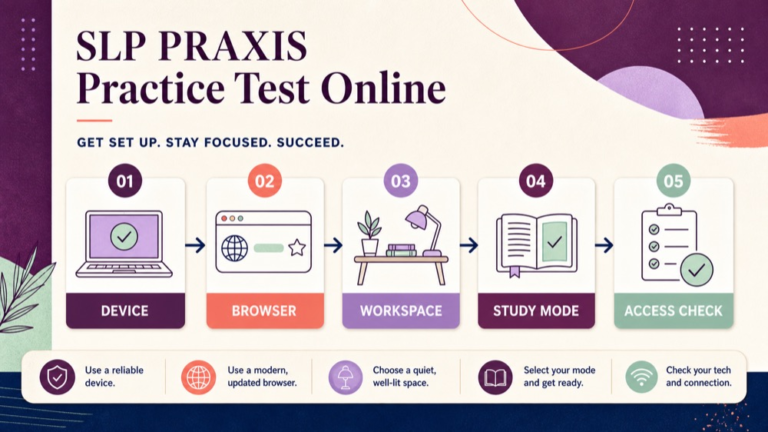
Before opening a long set, make the digital workspace predictable. Charge the device, use a comfortable screen size, close unrelated tabs, silence nonessential notifications, and confirm that the platform loads correctly. Keep the materials you are allowed to use within reach, but do not create an open-reference condition by accident when the purpose is independent work.
| Setup layer | Check | Write in the session record |
|---|---|---|
| Device | Power, keyboard, pointer, and stable connection. | Device and any technical issue. |
| Browser | Correct account, readable zoom, and one prepared window. | Browser or platform condition. |
| Workspace | Clear desk, water, and planned scratch space. | Distractions or interruptions. |
| Access | Question navigation and answer controls work. | Flag, back, and submit behavior. |
| Purpose | Learning, review, pacing, or simulation is stated. | Primary and secondary goals. |
Choose a comfortable text setting and keep it stable for comparable sessions. Accessibility adjustments are part of a real study condition, not a flaw in the method. Record the adjustment so you do not compare a visually demanding session with a comfortable one without noting the difference.
Run a brief access check before beginning. If a platform will not load, a control is confusing, or a notification interrupts the first items, fix the problem and restart the block when practical. If the interruption remains part of the session, record it rather than treating the result as a clean measure of reasoning or pace.
Keep the image and page experience light as well. The page should use appropriately sized, compressed visuals and load nonessential body images lazily. Your practice session needs attention for the questions, not a browser slowed by oversized media.
Use a consistent answer routine on screen
Screen-based questions reward a deliberate reading sequence. Read the final request, identify the decisive case detail, and then compare each option against the task. A consistent routine reduces the chance that a familiar phrase or the longest answer will take control of the decision.
- Locate the task: restate what the question asks you to choose, explain, prioritize, or do next.
- Mark the evidence: identify the setting, stage, goal, or clinical clue that should drive the answer.
- Predict the category: decide whether the best response should be an assessment step, treatment action, referral, communication, or professional-practice decision.
- Compare options: test each choice for task fit, evidence fit, sequence, and scope.
- Commit and rate confidence: select one option, record a confidence level, and flag only when a return is useful.
Keep notes short. A phrase such as task: next evaluation step or clue: performance changes by setting is enough to preserve the decision. Typing a paragraph for every online item can add a second task that distorts the session.
When two options seem reasonable, ask which one answers the exact request at the stated stage. Many clinical questions are not asking for every appropriate action. They are asking for the best next step, the most useful information, or the response that matches the goal and context.
After selecting an answer, do not reopen the item solely because another option sounds familiar. Return when you have a defined reason, such as a missed detail or a flagged ambiguity. This keeps online navigation from becoming unstructured answer switching.
Manage time without rushing the stem
Timing practice should preserve the answer routine while showing you where time accumulates. Start with a manageable block and observe whether the delay comes from reading, weighing two options, recalling content, navigating the platform, or writing excessive notes. Each cause needs a different repair.
| Timing signal | Likely friction | Next experiment |
|---|---|---|
| Long first read | Task and evidence are not separated. | Restate the final request first. |
| Long comparison | Distractors are not being eliminated. | Write one mismatch for the closest option. |
| Long recall | Content gap or weak retrieval. | Tag the concept and review it later. |
| Long notes | Recording exceeds the decision need. | Use a three-phrase note limit. |
| Late fatigue | Attention drops in a long block. | Use a planned break or smaller block. |
Do not solve a pacing problem by skipping the final request or ignoring the case detail. That may produce a faster number while training an answer error. Instead, reduce the block size, use a gentle time cue, and practice the same reading sequence until it takes less effort.
When you begin a timed block, record the start condition and the stop condition. If you pause for a technical issue or personal interruption, mark the time separately. A transparent record helps you distinguish a genuine pacing pattern from a one-time disruption.
Use a timer as feedback, not as a source of panic. The purpose of an online timing block is to identify one behavior you can change, such as spending too long defending a distractor that already fails the question task.
Use flags, notes, and breaks intentionally
Online navigation tools can support a thoughtful process, but they can also invite repeated checking. Decide your flag rule before the set. For example, flag an item when you have narrowed it to two options but need to reread one decisive detail. Do not flag every uncomfortable question.
| Tool | Useful rule | Review prompt |
|---|---|---|
| Flag | Return only when a specific check is possible. | What detail will I verify? |
| Brief note | Record task, clue, and confidence. | Can I explain the choice later? |
| Break | Use a planned pause between blocks. | Did attention change afterward? |
| Back button | Return for a reason, not discomfort alone. | What changed in my evidence? |
| Review mark | Separate uncertainty from a confirmed miss. | Which category needs repair? |
For practice, it is reasonable to experiment with navigation. One session may use a forward-only first pass, while another may allow a planned return. Record the rule. Otherwise, a change in flag behavior can look like a change in content knowledge.
Breaks are also part of the condition. If you are testing learning, pause between short blocks and review calmly. If you are testing sustained attention, use a defined longer block and document the break plan. Avoid turning a break into an untracked search for outside answers.
After a flag or break, restart the routine at the task. Ask what the item is requesting now, not what you remember thinking several minutes earlier. This resets the evidence relationship and limits anchoring to an early guess.
Review scores as evidence, not a verdict
A score can tell you where to look, but it cannot explain why an answer was missed. Pair the percentage with accuracy by domain or task type, confidence, pacing, and the quality of your rationale. A lower-confidence correct answer may still need review if the rule was not understood.
| Result signal | Question to ask | Action |
|---|---|---|
| High-confidence miss | What assumption overruled the evidence? | Write a corrective rule. |
| Low-confidence correct | Could I explain why it fits? | Verify the rationale. |
| Repeated domain miss | Is the issue content or task sequence? | Choose focused study. |
| Slow accurate block | Where did comparison expand? | Practice elimination. |
| Fast inaccurate block | Did I skip the final request? | Restore the reading routine. |
Use categories that lead to action. Task-reading error, evidence-selection error, content-recall gap, sequence error, distractor-comparison error, screen-friction error, and pacing error are more helpful than one undifferentiated missed label.
Do not convert an online result into a guaranteed live outcome. Providers can differ in scope, item construction, explanation quality, and interface. The strongest interpretation is local: under this condition, this type of decision needs this next practice action.
Save a short reflection after every block. Write what the session tested, what pattern appeared, and what you will change in the next block. Three sentences can preserve more learning than a second unreviewed set.
Review an online test with a five-column error log
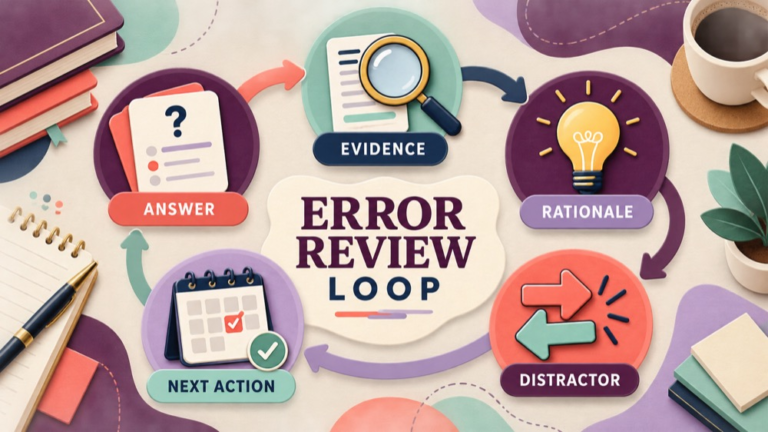
Review is where an online practice test becomes a study tool. Use a five-column log for each miss, uncertainty, or high-confidence answer that you cannot explain: answer, evidence, rationale, closest distractor, and next action. The goal is to capture the decision relationship, not to copy a protected question bank.
| Column | Write | Example prompt |
|---|---|---|
| Answer | Your choice and confidence. | What did I choose before feedback? |
| Evidence | The decisive case detail. | Which fact should have changed the choice? |
| Rationale | Why the best option fits. | What rule connects task and evidence? |
| Distractor | Closest alternative and mismatch. | Why is it less appropriate now? |
| Next action | One study or setup experiment. | What will I test in five new items? |
Review high-confidence misses first if your time is limited. They can expose a rule that feels familiar but is too broad. Then review low-confidence correct answers to ensure that recognition did not substitute for reasoning. A well-explained correct answer is evidence of a usable process.
Keep the log concise and original. You can paraphrase the case, record the concept, and write your own transfer example without reproducing commercial material. If the resource has unclear licensing or asks you to share protected content, use your own notes or a legitimate access path.
End each row with an observable action. Instead of write more about assessment, use compare five evaluation items in which setting changes and state the next information step. A specific action makes the next online session easy to start and easy to audit.
Question 1: online screening and evaluation
Question 1: An online practice item describes an adult who performs accurately on a quiet naming task but has difficulty following rapid multi-person discussion at work. The question asks what information should be gathered before selecting the next evaluation step. Which answer best fits the task?
- A. Choose treatment based only on the quiet naming score.
- B. Compare performance across quiet and workplace-like conversational demands.
- C. Conclude that the workplace concern is unrelated because one task was successful.
- D. Select a long-term service schedule before clarifying the communication demand.
Correct Answer: B. The case gives a meaningful contrast between structured individual performance and a workplace communication demand. Comparing the conditions can clarify whether rate, competing speakers, language load, attention, or another contextual factor changes performance before the next evaluation decision is made.
Why the Other Options Are Wrong: A narrows the conclusion to one quiet task and moves to treatment too early. C dismisses the functional concern without examining the setting. D chooses logistics before the communication demand is defined. Each alternative either ignores the contrast or skips the information-gathering stage.
Exam Trap: When a stem contrasts two settings and asks what to gather next, preserve the contrast. Do not let a clean score in one condition erase evidence from the condition named in the question.
Question 2: online treatment and generalization
Question 2: A client uses a speech strategy during a structured clinic drill but does not use it during a workplace meeting. The stated goal is effective participation in meetings. Which response best connects the next practice decision to the goal?
- A. Add more clinic repetitions without observing the meeting demand.
- B. Practice and measure the strategy in a relevant workplace-like interaction.
- C. Replace the participation goal with a clinic-only accuracy target.
- D. Decide that the strategy failed without examining the context difference.
Correct Answer: B. A relevant workplace-like interaction can reveal partner, task, environmental, or time demands that influence strategy use. Measuring the strategy where participation matters keeps the treatment decision connected to the stated functional goal and provides information for adjusting support.
Why the Other Options Are Wrong: A repeats the easier condition without addressing the transfer problem. C changes the goal to fit the clinic measure. D treats a context difference as proof of failure instead of information for the next step. None of those choices examines functional generalization.
Exam Trap: Separate acquisition from generalization. If the item names a participation goal and a setting contrast, look for the option that measures or practices the skill in the relevant context.
Question 3: online professional practice
Question 3: A study partner asks you to upload screenshots from a commercial online practice resource to a private group folder. The partner says the folder is only for classmates. Which response best supports responsible preparation?
- A. Upload the screenshots because the group is private.
- B. Decline to reproduce protected material and suggest original notes or licensed access.
- C. Remove the provider name and upload the same screenshots.
- D. Share the answer letters while withholding the question wording.
Correct Answer: B. A private group does not establish permission to reproduce or redistribute commercial material. Declining the request while offering original notes, a paraphrased concept discussion, or licensed access preserves a legitimate study path and respects the resource boundary.
Why the Other Options Are Wrong: A treats limited visibility as permission. C removes attribution but does not resolve copying. D still distributes material derived from the commercial resource. A responsible preparation choice identifies the boundary and offers a lawful alternative.
Exam Trap: Do not let the online setting blur the professional issue. Identify the requested action, consider the permission boundary, and choose the response that supports learning without redistributing protected content.
Turn missed online questions into study blocks
After the error log is complete, group the rows by repair rather than by the order in which they appeared. Five misses may share one cause, such as skipping the final request, confusing screening with diagnosis, or choosing an intervention before clarifying the functional goal. A grouped repair block is more efficient than rereading every explanation in sequence.
| Pattern | Study block | Completion evidence |
|---|---|---|
| Task mismatch | Restate the final request in five new items. | Each task is named before options. |
| Context mismatch | Compare the same skill across settings. | One evidence clue is identified. |
| Sequence gap | Order assessment, interpretation, and action. | Next step is justified. |
| Content gap | Review one focused concept source. | Rule and transfer example are written. |
| Distractor issue | Explain why the closest option is weaker. | Mismatch is stated without vague language. |
Keep the next block small enough to review. If you have a broad domain concern, choose one decision pattern and test it with several original or legitimately accessed items. The purpose is to see whether the rule transfers, not to produce a larger pile of unanswered questions.
Schedule a return check. A repair is more credible when you can use it in a changed case several days later. Record the changed detail and whether the same reasoning still works. This turns online practice into a sequence of decisions instead of a one-time score event.
Compare learning mode and simulation mode
Learning mode and simulation mode have different rules, and both can be useful. Learning mode gives you space to inspect the rationale while the item is still fresh. Simulation mode asks you to protect independent commitment and delayed review. Use the name of the mode in your notes so the results remain interpretable.
| Feature | Learning mode | Simulation mode |
|---|---|---|
| Feedback | Immediate or short-batch review. | Delayed until the block ends. |
| Timing | Optional or gentle. | Defined before the first item. |
| Notes | May include a fuller rationale. | Brief task and confidence notes. |
| Best question | What rule does this item teach? | How did I work under this condition? |
| Output | Concept and transfer example. | Error pattern and next experiment. |
Do not call a learning block a simulation simply because it was completed online. A simulation is a defined practice condition, not a label that makes a resource official. Describe what you did, what the resource supplied, and what the result can reasonably tell you.
Use a short transition between modes. Review the most important learning-mode repairs first, then begin a separate independent block. That separation prevents a remembered explanation from silently becoming support during the next benchmark.
Build a seven-day online practice sequence
A seven-day sequence can give online work a rhythm without turning every day into a full test. The order below moves from setup and reasoning toward timing and transfer. Adjust the number of items to your schedule, but keep the purpose and review record intact.
- Day 1: confirm the current ETS source, test access, and write the online condition you will use.
- Day 2: complete a short learning block and record the task, evidence, rationale, and distractor.
- Day 3: group errors by repair and review one focused content or sequence gap.
- Day 4: answer a changed-setting set without immediate explanation access.
- Day 5: complete a light-timed block and identify the exact pacing friction.
- Day 6: repeat the repair with new items and compare confidence with accuracy.
- Day 7: review the week, protect the strongest rules, and select the next priority.
Use rest and recovery as part of the plan. A tired session can still be useful if you label it honestly, but do not compare its score with a focused session without noting the condition. Consistent records help you decide whether to add content review, timing work, or better screen habits.
At the end of the week, choose one stable element and one variable for the next cycle. For example, keep the browser and answer routine stable while changing the case context. This makes transfer visible and avoids changing every part of the study setup at once.
SLP Praxis practice test online checklist
Use this checklist before and after an online session.
- I confirmed that the resource is for Speech-Language Pathology (5331) or labeled it as broader SLP review.
- I stated the purpose: learning, independent decision practice, transfer, pacing, or simulation.
- I checked the device, browser, access controls, screen setting, and connection.
- I recorded whether feedback was immediate, delayed, or unavailable.
- I decided how flags, notes, back navigation, and breaks would be used.
- I read the final request and identified the decisive case evidence.
- I recorded my answer and confidence before reviewing the explanation.
- I explained why the selected answer fit the task and stage.
- I explained why the closest distractor was weaker.
- I classified the error or uncertainty by a repairable category.
- I chose one next study action and one changed-case transfer check.
- I verified current administration information on the live ETS source.
The checklist keeps the platform from becoming the whole lesson. A stable screen matters, but the study result becomes useful when the session ends with a clear decision about what to practice next and how you will know that the repair helped.
Sources and next steps
Use the live ETS Speech-Language Pathology (5331) page for current exam identity, format, duration, question count, and changing administration information. Use the ETS practice-test selector for current source-controlled preparation options, and use ASHA preparation guidance for planning work around strengths and weaknesses.
Next, choose one legitimate online resource, label the condition, complete a manageable block, and reserve time for rationale review. Record the screen friction separately from the clinical reasoning pattern. Then test one repair in a changed case rather than immediately starting an even larger set.
For a structured preparation path, see the SLP Study Center Complete Prep resource. Keep current test instructions tied to ETS, and use online practice to build repeatable decisions, measured pacing, and a review habit that produces the next useful action.