
Finding a praxis speech language pathology test center is not just a matter of choosing the closest pin on a map. The useful location is one that is actually available for Speech-Language Pathology 5331, fits the date you need, can be reached with a reasonable plan, and works with the appointment and admission instructions attached to your ETS account. A center can look convenient in a general search and still be unavailable for your test or time window.
Table of Contents
- Use the ETS Test-Center Search
- Understand Availability and Appointment Windows
- Evaluate the Center Before Booking
- Book, Review, and Save the Confirmation
- Plan the Test-Center Day
- Create a Backup Plan Without Creating Confusion
- Quick Test-Center Checklist
ETS says that Praxis tests are offered at authorized test centers and that test takers can view available centers and time slots during registration. Its current center page also explains that availability varies by exam, that some tests may follow seasonal schedules, and that the live search appears after you sign in and begin registration. Use the account-specific search as the final source for your appointment.
Use the ETS Test-Center Search
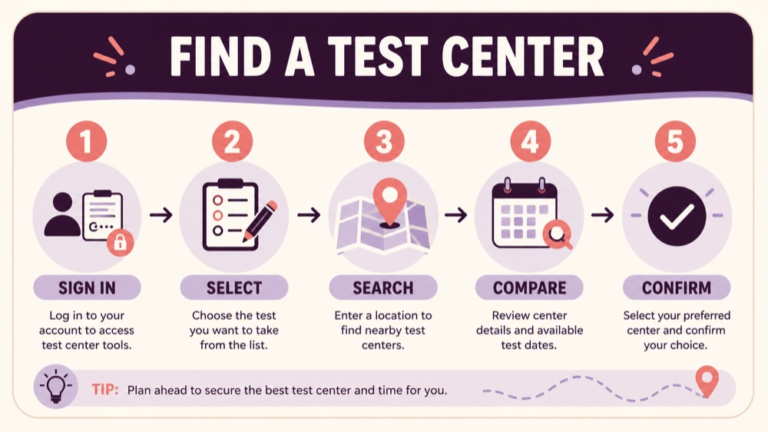
Start at the official ETS flow rather than a third-party list. Sign in to your Praxis account or create one, select the test associated with your licensure or credential goal, and continue to the scheduling page. ETS’s registration page describes a sequence that includes finding the test, reviewing availability, choosing a date and location, reviewing the cart, and entering payment information.
When the test-center option is available for your selected appointment, search by the location filters ETS provides. The current test-center page describes searching by city, ZIP code, or state, then viewing available locations and time slots. The results are not a permanent directory. They are tied to the selected test and the current scheduling flow, so record the result only after you have reviewed the actual appointment details.
Keep the test identity visible during this step. A general Praxis search may contain multiple subjects, and a center may offer some Praxis tests without offering Speech-Language Pathology 5331 at the time you need. Confirm the test name and code before comparing addresses. If the physical-center option does not appear, check whether the selected test, date, location, or delivery method affects the results and use ETS support when the account remains unclear.
- Open the current ETS account and start the real registration flow.
- Confirm the test is Speech-Language Pathology 5331.
- Select the test-center delivery option when it is available.
- Search by city, ZIP code, or state using the account’s filters.
- Compare the live dates and time slots displayed for each center.
- Review the address and appointment details before payment.
- Save the confirmation after the center and time are selected.
- Recheck the appointment before travel because availability can change.
Understand Availability and Appointment Windows
“There is a center nearby” and “there is a center with a usable appointment” are different statements. ETS notes that some Praxis tests are available year-round while others use a seasonal schedule, and that not every test is offered at every center or on every date. The account-specific results are therefore more important than a generic location directory.
If you need a particular deadline, search early enough to compare more than one reasonable location and time. A broader search radius may reveal options, but travel time and local access still matter. If you are scheduling around graduate coursework, clinical work, or a credential application, put the deadline beside the appointment window and leave room for changes according to the current ETS policies.
Do not treat a listed slot as a guarantee that every later step will remain unchanged. Complete the registration flow and save the confirmation. If you need to change the appointment, follow ETS’s current appointment-management instructions; do not rely on an informal cancellation rule from another learner.
Evaluate the Center Before Booking
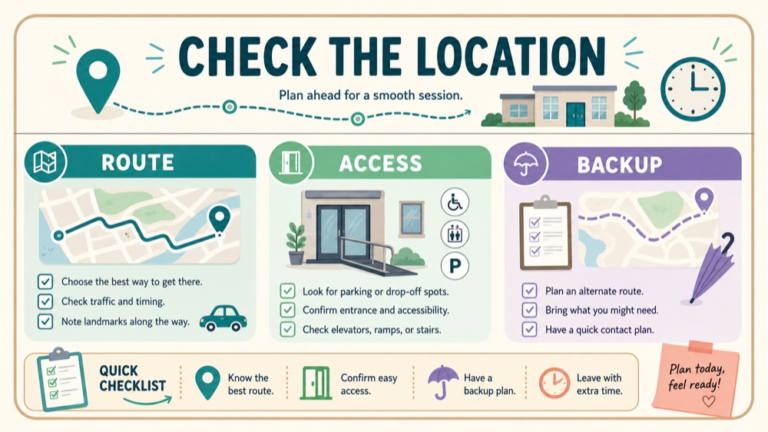
Once the account shows possible centers, compare practical fit. A center that is ten minutes closer may be a poor choice if the route is unpredictable, parking is unclear, or the start time collides with a work obligation. The decision is not about finding a perfect room. It is about reducing avoidable uncertainty while preserving enough energy for the test.
Check the route at the likely travel time, not only at midday on a weekend. Look for the building entrance, parking or transit connection, and the amount of walking from the drop-off point. If weather, construction, or local events could affect the route, identify a second route or a second reasonable center when the account offers one. Keep the backup as a plan, not as an unconfirmed appointment.
For access needs, review the current provider instructions before selecting a center. The ETS Study Companion explains that test takers should expect proper identification at a test center. Accommodation approval and testing-location arrangements can involve additional steps, so contact the responsible provider before paying if your requirements are not reflected in the appointment record. A location decision should be based on confirmed access information rather than assumptions about a building.
- Distance and realistic travel time from your starting point.
- Parking, public transit, rideshare, or drop-off plan.
- Building entrance and room-finding instructions.
- Appointment start time in the local time zone.
- Compatibility with your approved accommodation, if applicable.
- Availability of a route or center backup without confusing it with a booking.
- Time needed for identification and check-in.
- A calm departure time with a reasonable buffer.
Book, Review, and Save the Confirmation
After choosing the best available option, review the entire cart and personal information. ETS’s registration flow includes a cart review and payment step. Confirm the test, date, time, delivery method, center, address, and any score-recipient or institution details before completing the transaction. Keep the confirmation in your account and in a second accessible format if the provider permits you to do so.
Use a two-person check only for accuracy, not for permission. A trusted person can read the date and address back to you, but the ETS account remains the authority. If your name, date, or location is wrong, use official appointment-management or support channels. Do not create a second registration to solve a question that should be clarified first.
Review the center again a few days before the appointment and once more before you leave. Rechecking is not a sign that you distrust the original booking; it is a way to catch a changed instruction, route problem, or forgotten detail. Keep the test-center address and support information available without relying on a last-minute search.
Plan the Test-Center Day
Separate the 150-minute 5331 testing length currently listed by ETS from the total appointment event. Travel, building entry, identification, security, and the computer tutorial are not the same as answering questions. Plan to arrive according to the provider’s current instructions and with enough margin for the route you actually have.
The Study Companion describes an opportunity to learn the computer interface before testing time begins, including answering, skipping, and returning to questions. Use that time to make the navigation familiar. The goal is to begin the testing clock with fewer interface questions competing for attention. Follow the local proctor’s directions if they differ from your assumption.
Pack lightly and follow the provider’s permitted-item rules. Identification is the priority. Other items such as food, water, notes, bags, or electronic devices may be handled outside the room or restricted. Check the current appointment instructions instead of copying a center policy from a different city.
- Confirm the address and entrance before leaving.
- Bring the identification required for the appointment.
- Carry appointment details in an accessible format.
- Use the route and departure buffer you planned.
- Follow check-in, security, and storage directions.
- Use the interface tutorial to practice approved navigation.
- Ask staff before acting when an item or procedure is unclear.
- Keep the post-appointment plan simple and documented.
Create a Backup Plan Without Creating Confusion
A backup plan should answer “What will I do if the route or center becomes difficult?” It should not invent a replacement appointment. Save one alternative route, the official support channel, and the current appointment-management page. If you need a different center or date, make that change through the account and confirm the new record before traveling.
Do not assume that a nearby center can take you as a walk-in, that a listed address has the same hours as the appointment, or that an at-home option is interchangeable with a center appointment. Each of those choices depends on the current ETS account and policies. A calm backup plan protects your decision-making; an unconfirmed assumption adds risk.
If a center issue occurs on test day, document what happened and ask the staff member what can be verified. Contact ETS when the issue concerns registration, appointment status, or a policy decision. Keep receipts or records when a formal follow-up may be needed, and avoid relying on a verbal promise that is not reflected in the account.
Quick Test-Center Checklist
Before you finalize the appointment, ask:
- Is this definitely Speech-Language Pathology 5331?
- Does the live ETS account show the desired date and time?
- Is the delivery method clearly listed as a test center?
- Have I reviewed the complete address and entrance plan?
- Does the route work at the actual travel time?
- Have I checked identification and accommodation instructions?
- Have I saved the confirmation and official support path?
- Do I have a realistic backup route or change procedure?
For current location and appointment information, review the ETS Praxis test-center page and the ETS registration process. Confirm the test-specific details in the Speech-Language Pathology 5331 listing, and use the ETS Study Companion for test-experience context. If you want a preparation plan for the content itself, review SLP Study Center preparation resources separately from the live appointment decisions.