
An slp praxis practice exam online can rehearse more than content recall. It can help you practice reading selected-response stems on a screen, maintaining a focused workspace, recording decisions, and reviewing rationales after the session. The value comes from the condition you create and the review you complete.
The current ETS Speech-Language Pathology (5331) page describes a computer-delivered selected-response test with 132 questions and 150 minutes. Use the live ETS page and your account for changing details. ASHA preparation guidance also supports practice questions, timed work, and a plan shaped by individual strengths and weaknesses.
What an online practice exam should rehearse
An online practice exam can rehearse several layers at once: screen reading, selected-response decision-making, attention, timing, and review. Decide which layer matters before the session. A setup designed for content learning should not be judged by the same result as a longer pacing rehearsal.
| Layer | What to practice | What to record |
|---|---|---|
| Screen reading | Stem, final request, and options. | Task restatement. |
| Decision | Evidence, purpose, and fit. | Answer and confidence. |
| Attention | Working through a digital set. | Distraction or fatigue signal. |
| Timing | Pace under a defined condition. | Slow step and time. |
| Review | Rationale and closest distractor. | Next repair action. |
Choose a primary layer and a secondary layer. For example, you may use a short online set to practice evidence marking while also noticing whether scrolling makes you lose the final request. This makes the result more useful than a general statement that the set felt difficult.
Use legitimate preparation material and original educational items. The online format is a delivery condition for practice, not proof that a resource controls current test instructions. Keep official facts connected to ETS and study guidance connected to your chosen preparation plan.
Confirm the current 5331 source
Begin with the current ETS Speech-Language Pathology (5331) page. Use it to confirm the subject identity, current delivery and timing information, broad content direction, question count, duration, and preparation links. The page currently lists 132 questions and 150 minutes for a computer-delivered selected-response exam, so date your administration note.
Use the ETS practice-test page to search for current preparation material by subject. Read the format and purpose of a resource before treating its online mode as a simulation. Use ASHA’s Praxis preparation guidance for practice planning and for using strengths and weaknesses to select follow-up work.
- Confirm the subject: label Speech-Language Pathology (5331).
- Record the source: note provider, title, date, and link.
- Label the condition: identify learning, review, timing, or simulation work.
- Separate administration facts: use ETS for current delivery and appointment information.
- Protect originality: use legitimate preparation material rather than purported secure content.
A practice page may use an online interface without reproducing every official test condition. Write down what your session actually tested. That note will keep you from interpreting a short browser-based set as evidence about a different practice question.
Set up an online practice exam with purpose
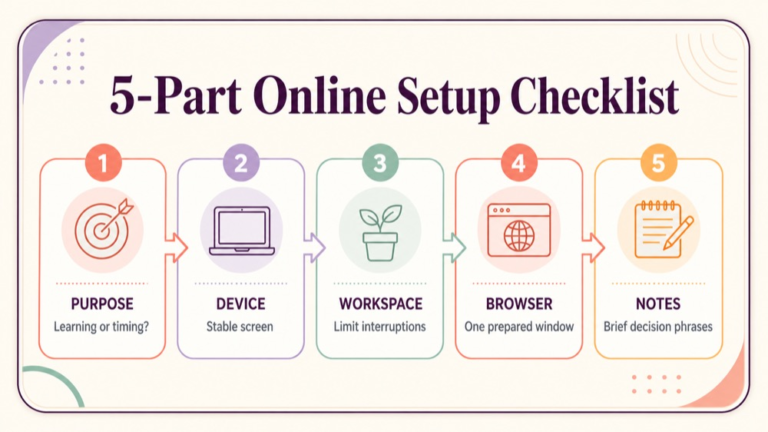
Before you open the first item, choose the purpose, set up the device, and remove avoidable interruptions. A simple setup gives you a stable baseline. If the session is meant to teach, leave room for rationale notes. If it is meant to check pace, protect the review period after the timer ends.
| Setup item | Decision | Why it matters |
|---|---|---|
| Purpose | Learning, review, timing, or simulation. | Defines the interpretation. |
| Device | Stable screen, power, and input. | Reduces technical noise. |
| Workspace | Clear desk and planned materials. | Limits visual switching. |
| Browser | One prepared window or platform. | Protects attention. |
| Notes | Allowed scratch space and format. | Supports consistent decisions. |
| Review time | Reserved after the final item. | Turns results into learning. |
Use the same basic setup for comparable sessions, then vary one factor when you want to test it. If one session uses a laptop and another uses a small screen, note the change. The aim is not to create artificial perfection; it is to know what condition produced the result.
Test access before a longer block. Confirm that the platform loads, the controls are readable, and your notes are available. If a technical issue interrupts the session, mark the interruption instead of treating the result as a clean timing measure.
Choose a realistic screen-based condition
Screen-based practice can feel different from paper review. Scrolling, text density, browser tabs, and the location of answer controls can affect how you read. Use a condition that supports your purpose and record any feature that changes how you work through the stem.
| Screen factor | Possible effect | Adjustment |
|---|---|---|
| Text size | More scrolling or visual strain. | Use a comfortable stable setting. |
| Window size | Stem and options split across views. | Note whether scrolling affected reading. |
| Navigation | Back or flag controls change flow. | Practice the chosen navigation rule. |
| Notifications | Attention shifts away from the item. | Silence nonessential alerts. |
| Notes | Typing competes with reading. | Use brief decision phrases. |
Do not change the screen setting repeatedly during one session unless that is the variable you are testing. Stability makes your review more interpretable. If accessibility adjustments are needed, use them consistently and document them as part of the condition.
A realistic setup does not mean copying a live appointment environment without authorization or access. It means creating a repeatable screen-based practice condition that lets you focus on the reasoning task and identify any digital friction.
Protect focus and manage digital distractions
Online practice makes extra information easy to open. Decide before the session whether you will work independently, use a permitted reference, or review explanations after each item. Mixing these conditions without recording them makes the result difficult to interpret.
| Condition | Best use | Record |
|---|---|---|
| Independent | Commit to answers without support. | Confidence and time. |
| Supported learning | Check a concept during study. | What support changed the answer. |
| Immediate review | Learn from each rationale. | Decision rule and distractor. |
| Delayed review | Practice a batch before checking. | Pattern across the set. |
| Light timing | Find a pacing friction point. | Slow step and distraction. |
Use a visible note that states the condition at the top of your session record. “Independent, delayed review, laptop, 20-item block” tells you more than “online practice completed.” This simple label protects the meaning of later comparisons.
If a notification or interruption occurs, pause and record it. You do not need to discard the whole session, but the interruption belongs in the interpretation. A small note helps distinguish a knowledge miss from a broken focus condition.
Read screen-based stems carefully
Screen reading can encourage fast scanning. Slow down at the final request and any contrast words such as before, after, most appropriate, next, or best response. Restate the task in a few words before you compare options.
| Screen-reading step | Prompt | Record |
|---|---|---|
| Locate task | What must I choose? | Action or measure. |
| Mark contrast | What condition changes the decision? | Setting, stage, or goal. |
| Sort evidence | Which detail is decisive? | One clue. |
| Compare options | Which choice answers the task? | Choice and confidence. |
| Check fit | What makes the closest option weaker? | Mismatch. |
If you scroll, reread the final request after reaching the options. The extra pass can protect against answering a related question from memory. It also gives you a consistent point to review when a wrong answer seems plausible.
Use your cursor or a brief note to anchor the decisive clue, but avoid turning every sentence into a highlight. The purpose of a screen note is to preserve the decision target, not to reproduce the entire stem.
Separate timing from answer quality
Online practice can produce a time number, but the number needs a condition. A short learning block with immediate review is not comparable to a delayed-review timed block. Record pace, answer confidence, and rationale quality as separate observations.
| Observation | Question | Next action |
|---|---|---|
| Pace | Where did time accumulate? | Practice that step. |
| Accuracy | Which tasks were missed? | Tag the error. |
| Confidence | Where were guesses hidden? | Review rationale. |
| Screen friction | Did navigation or scrolling disrupt reading? | Adjust setup. |
| Review quality | Can I explain the choice afterward? | Write a transfer prompt. |
Use light timing after the task-and-evidence routine is familiar. If the timer causes you to skip the final request, the block is testing a reading shortcut rather than useful pacing. Shorten the set, preserve the process, and raise the condition gradually.
Do not use an online result to promise a live score or current administration outcome. The session shows how you worked under one chosen condition. Use it to choose the next practice action.
Review an online practice exam session
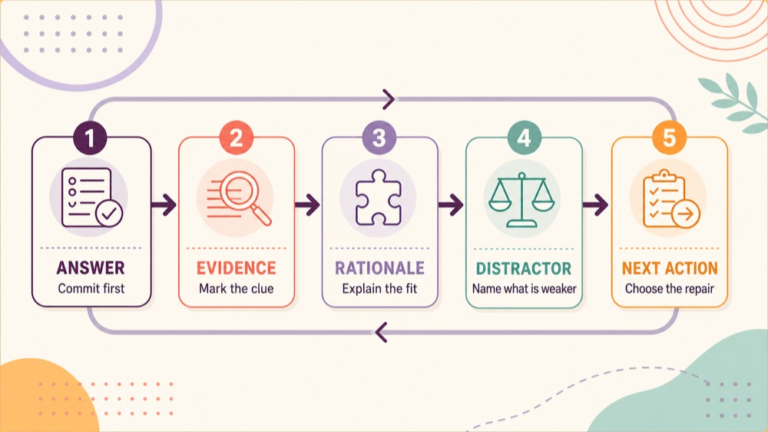
Review the session after you finish, not only the percentage. Sort each miss or uncertainty by task reading, evidence, content, sequence, comparison, screen friction, or pacing. Then choose one repair that can be tested in a new item.
| Review field | What to write | Why it helps |
|---|---|---|
| Answer | Letter and confidence. | Shows the starting decision. |
| Evidence | Clue that should have mattered. | Improves case reading. |
| Rationale | Why the correct option fits. | Builds a rule. |
| Distractor | Closest alternative and mismatch. | Improves comparison. |
| Repair | One study or setup action. | Creates follow-through. |
| Transfer | Changed case to try later. | Tests adaptability. |
Review high-confidence misses first when time is limited. They may reveal an overbroad rule or an online scanning habit. Then review low-confidence correct answers to ensure that the answer was supported rather than recognized from a familiar phrase.
Make the repair specific. “Study more” is too broad. “Restate the final request before comparing options in five evaluation items” gives you a repeatable action and a clear completion point.
Question 1: online evaluation decision
Question 1: An online practice item describes a student who follows directions in a quiet individual task but misses parts of directions during noisy group instruction. The question asks what information should be gathered before planning the next evaluation step. Which answer best fits?
- A. Select an intervention based only on the quiet individual task.
- B. Compare performance across quiet and noisy classroom-like conditions.
- C. Conclude that the group concern is unrelated because one task was successful.
- D. Choose a long-term schedule before clarifying the classroom demand.
Correct Answer: B. Comparing the two relevant conditions addresses the evidence supplied by the item and can clarify how noise, language load, or group demands affect performance. It gathers information before narrowing the plan.
Why the Other Options Are Wrong: A ignores the group condition. C treats one successful setting as a complete explanation. D chooses logistics before the communication demand is understood. The alternatives either narrow too soon or skip the information step.
Exam Trap: A screen-based item can make fast pattern matching tempting. When the stem gives a setting contrast and asks what to gather next, preserve the contrast and choose an information step.
Question 2: online treatment transfer
Question 2: A client uses a communication strategy successfully in a structured clinic task but not during a workplace meeting. The stated goal is participation in meetings. Which online practice answer best matches the goal?
- A. Add more clinic repetitions without observing the meeting demand.
- B. Practice and measure the strategy in a relevant workplace-like interaction.
- C. Replace the participation goal with a clinic-only accuracy target.
- D. Decide that the strategy failed without examining the context difference.
Correct Answer: B. A workplace-like interaction can reveal partner, task, or environmental demands that affect strategy use. Measuring performance in the relevant context keeps the decision connected to participation and provides information for adjusting support.
Why the Other Options Are Wrong: A repeats the clinic condition without addressing the stated setting. C changes the goal to fit the easiest measure. D treats a context difference as proof of failure. Each alternative misses the need to examine functional transfer.
Exam Trap: Separate acquisition from generalization. If the item names a participation goal and a setting contrast, choose the option that measures the strategy where the goal matters.
Question 3: online resource boundaries
Question 3: A friend asks you to upload a screenshot of a commercial practice resource into a shared online folder. The friend says the folder is private and intended only for study. Which response best fits responsible preparation?
- A. Upload the screenshot because a private folder is not public.
- B. Decline to share the protected material and suggest original notes or licensed access.
- C. Remove the provider name and upload the same screenshot.
- D. Share the answer letters while withholding the question wording.
Correct Answer: B. Declining to reproduce material without permission and offering original notes or licensed access respects the resource boundary while preserving a practical study path. The setting does not establish permission to copy.
Why the Other Options Are Wrong: A treats privacy as permission. C removes attribution but does not resolve reproduction. D still shares material derived from the commercial resource. A responsible response identifies the boundary and offers a legitimate alternative.
Exam Trap: Do not let the online setting blur the professional question. Read the requested action, identify the boundary, and choose a response that supports study without distributing unauthorized material.
Use screen notes without overloading the session
Screen notes should preserve the reasoning target, not compete with it. Use short phrases such as “task: next information,” “clue: setting contrast,” and “mismatch: intervention too early.” These notes can be reviewed quickly after the session.
| Note type | Example | Use after the session |
|---|---|---|
| Task | Best measure. | Group similar items. |
| Clue | Performance changes by setting. | Review context fit. |
| Stage | Before plan selection. | Check sequence. |
| Choice | B, medium confidence. | Compare with rationale. |
| Mismatch | Later action or unsupported assumption. | Write repair rule. |
If typing slows reading, switch to a paper note or a few handwritten marks. The best note system is the one that preserves the task and evidence without adding digital friction to the online condition.
Do not record personal information that is not needed for study. Original practice cases can be reviewed as educational examples; keep the note focused on the reasoning relationship and the study action.
Repair online practice errors
Online errors can come from the question, the knowledge, the setup, or the screen-reading process. Classify before you choose a resource. A new textbook will not repair a notification problem, and a browser adjustment will not replace a missing concept review.
| Error source | Signal | Repair |
|---|---|---|
| Task reading | You answered a related request. | Restate final sentence. |
| Evidence | You missed the decisive detail. | Mark one clue before options. |
| Content | You cannot explain the concept. | Review a focused source. |
| Screen setup | Scrolling or alerts disrupted work. | Stabilize the workspace. |
| Pacing | You knew the process but ran long. | Use a smaller timed block. |
Choose one primary repair for the next session and keep the others in the note. This prevents a broad reaction to one online result. Test the repair with a different item so you can see whether the change helped.
If a question or explanation seems unclear, mark it as a source limitation. Verify important clinical content against a responsible source instead of letting one uncertain item define your online practice rule.
Repeat the online condition with variation
Repeat a basic online setup for comparability, but vary one meaningful feature when you test transfer. You might change the setting in the case, switch from immediate to delayed review, or use a mixed-domain set. Record the change so the result can be interpreted.
| Stable element | Variable element | What it tests |
|---|---|---|
| Device and screen | Item domain. | Content switching. |
| Independent answering | Review timing. | Retrieval versus immediate support. |
| Brief notes | Case setting. | Rule transfer. |
| Quiet workspace | Light time condition. | Pacing under focus. |
| Same tracker | New source. | Resource comparison. |
Variation should answer a question. “Can I apply the sequence rule when the setting changes?” is more useful than changing several conditions at once. One variable makes the next review note clearer.
Use a longer online block only after shorter sessions produce consistent rationale records. Sustained practice is valuable when you have a reason to check attention and pacing, not simply because a larger set is available.
Plan a week of online practice
A weekly online plan can move from setup to reasoning to timing. Keep the first sessions explanation-rich, then use delayed review and a small light-timing block. End with a source check and a repair decision.
- Day 1: test the platform, screen, notes, and purpose.
- Day 2: complete a short independent set without timing pressure.
- Day 3: review rationales and classify distractors.
- Day 4: study one repeated content or process gap.
- Day 5: answer a changed-case set online.
- Day 6: complete a small mixed timed block.
- Day 7: review patterns and adjust the next week.
Use the plan flexibly. If the setup itself creates friction, repeat setup work before adding more questions. If the rationale record is strong but pace is slow, use smaller timed blocks that preserve the answer process.
Keep official administration notes separate from your practice observations. The online study condition belongs in your tracker; current test details belong to the live ETS page.
SLP Praxis practice exam online checklist
Use this checklist before and after an online practice session.
- I confirmed the material is for Speech-Language Pathology (5331) or labeled it as general practice.
- I stated the purpose: learning, review, timing, transfer, or simulation.
- I recorded the device, screen, browser, and note condition.
- I chose independent, supported, immediate-review, or delayed-review work.
- I restated the final request before comparing options.
- I marked the decisive evidence and relevant setting or stage.
- I recorded confidence before checking the explanation.
- I explained why the selected option fits.
- I explained why the closest distractor is weaker.
- I chose one next action and one transfer prompt.
- I verified changing administration information on the live ETS source.
A checklist keeps the online environment from becoming the whole lesson. The device and platform matter, but the study result is most useful when it ends with a decision about what to practice next.
Sources and next steps
Use the live ETS Speech-Language Pathology (5331) page for current exam identity, format, duration, question count, and changing test information. Use the ETS practice-test selector for current source-controlled options, and use ASHA preparation guidance for planning practice around strengths and weaknesses.
Next, choose one online resource, label the condition, complete a small set, and reserve time for rationale review. Record the screen friction and reasoning pattern separately, then test one repair in a changed case.
For a structured preparation path, see the SLP Study Center Complete Prep resource. Keep current administration instructions tied to ETS, and use online practice as a repeatable condition for building decisions, pacing, and review habits.