
ets praxis slp registration involves more than selecting a date. You may need to create or confirm an ETS account, choose the correct Speech-Language Pathology Praxis test, review delivery and policy details, arrange any approved accommodations, and save the appointment confirmation. A careful sequence lowers the chance of booking the wrong test or discovering a missing detail too late.
Use the current ETS registration pages as the source of truth. Registration screens, fees, appointment availability, delivery choices, score-recipient rules, and rescheduling policies can change. This guide explains how to organize the process; it does not replace the instructions shown in your ETS account or the confirmation for your appointment.
Prepare before opening registration
Start with a short information folder. Keep the name you plan to use on the account, contact details, preferred testing window, program or licensing requirements, and any deadline that affects score reporting. Do not guess at a deadline; confirm it with the school, state board, or organization that will receive your score.
Also identify the test before you begin. The Speech-Language Pathology Praxis is associated with test code 5331 in current ETS materials checked for this guide, but verify the live test page and the selection shown in your account. A similar-sounding test or an old saved bookmark can create confusion.
Keep the preparation folder separate from sensitive credentials. Use a unique password and follow the security guidance in your ETS account. This article never needs your password, payment information, or application password.
Confirm your ETS account
If you already have an ETS account, sign in through the current ETS registration page and review the profile fields before starting a new appointment. Check spelling, email address, phone number, and any identity details required by the current process. If you cannot access an old account, use the official account-recovery route rather than creating several profiles.
If you are new to ETS registration, follow the current account-creation instructions. Read the field labels carefully and use information that matches your identification and program records where the instructions require it. The account is the place where appointment, payment, score, and support information may be connected, so accuracy matters.
- Profile: review the name and contact information used by the current account.
- Test: confirm the Speech-Language Pathology Praxis selection and code.
- Location: compare your preferred test center or at-home option with availability.
- Policies: read current cancellation, rescheduling, identification, and check-in instructions.
- Records: know where confirmation and score-recipient information will appear.
Follow the registration path
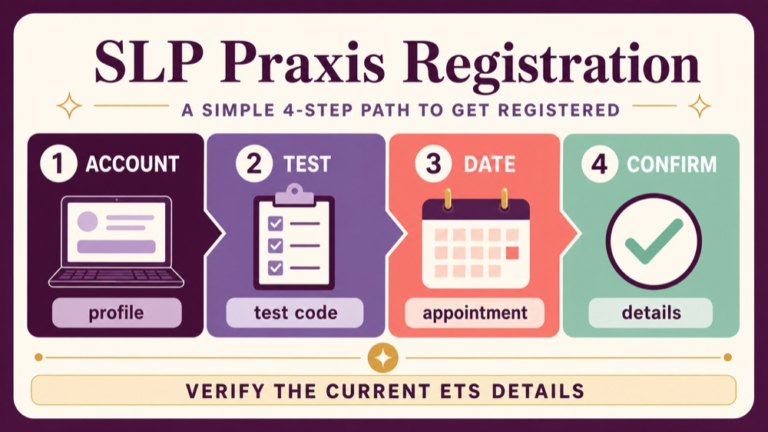
Think of registration as a path with checkpoints rather than one long form. First confirm the account, then select the test, review the available date and delivery choices, enter required information, review the order, and save the confirmation. The labels may look different as ETS updates its interface, but the decision points remain useful.
| Stage | What to verify | Useful record |
|---|---|---|
| Account | Profile and contact details are correct. | Account email and recovery method. |
| Test | Test name and code match your plan. | Test code 5331 if the live ETS page confirms it. |
| Appointment | Date, time, location, and delivery mode fit your needs. | Selected appointment details. |
| Review | Policies, price, and required fields are understood. | Order or review screen notes. |
| Confirmation | Booking is complete and instructions are available. | Confirmation number and email. |
Pause at each stage if a field is unclear. An extra minute spent reading an instruction is usually more useful than correcting a wrong selection after payment or scheduling.
Choose the correct SLP Praxis test
Read the full test name instead of relying on the words “Praxis” or “SLP” alone. Confirm the code, testing purpose, and any description attached to the selection. Compare it with your program or certification instructions, but let the current ETS test page control the test’s administrative description.
Do not assume that a preparation course’s name is the same as the ETS test name. A course may cover several domains or use a marketing label. Registration should be tied to the actual assessment you have been told to take. If your school or licensing organization gave you a deadline or score requirement, keep that information beside the registration screen while you check the selection.
Review date, delivery, and policy details
Compare the appointment with your practical needs. Check the date, start time, time zone if shown, address or at-home requirements, check-in time, identification rules, and equipment or environment requirements. The current ETS registration and test-center pages should answer the live logistics questions.
Read the cancellation and rescheduling policy before you submit. Policies may distinguish between test-center and at-home appointments or set different deadlines. Do not build a plan around a remembered rule from another exam. Save the policy page or note the date you checked it, then recheck it as the appointment approaches.
Registration is also a good time to place the exam on your study calendar. Work backward from the date to schedule blueprint review, timed practice, and a final source check. Keep the calendar flexible enough to respond to appointment changes.
Handle accommodations and score recipients
If you need testing accommodations, begin with the current ETS accommodations process before choosing a date that depends on approval. Read the eligibility, documentation, submission, and timing instructions in the current source. Ask ETS directly when a policy question is not answered by the page. A general article cannot determine which accommodation applies to an individual.
Review score-recipient information with the same care. Confirm whether you need to select recipients during registration, whether there are limits or fees, and how your program or licensing organization wants the score sent. Use the current ETS account instructions and your receiving organization’s requirements rather than assuming an older process still applies.
Check the details before you submit
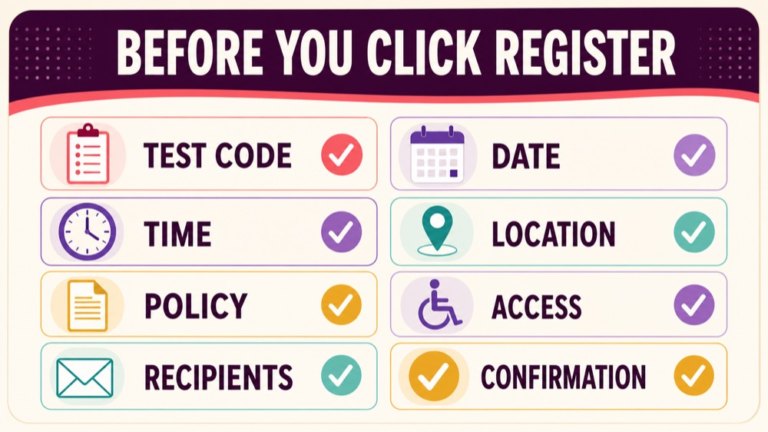
Before payment or final submission, read the review screen from top to bottom. Check the test name and code, date, time, location, delivery mode, contact information, accommodation status if applicable, price, and policies. A screenshot or saved PDF can help you compare the final screen with the confirmation, provided it does not expose sensitive payment information.
- Is the test the Speech-Language Pathology Praxis you intended to select?
- Does the code match the current ETS test page?
- Does the date leave enough time for your program or licensing deadline?
- Can you meet the center or at-home check-in requirements?
- Did you read the current cancellation and rescheduling rules?
- Have you followed the current accommodations process if you need it?
- Are score-recipient details consistent with your organization’s instructions?
- Do you know where the confirmation number and support link will be stored?
If any answer is unclear, stop and check the source or contact ETS support. The right time to resolve a registration question is before the appointment is finalized.
Save and recheck your confirmation
After submission, look for confirmation in the account and the email address associated with it. Save the confirmation number, appointment details, check-in instructions, and support contact in two secure places. Do not post the confirmation publicly or include unnecessary personal details in a study group.
Recheck the appointment after any account change and again before test day. Availability, instructions, or policies may be updated. Use the current ETS page and your own confirmation as the final reference.
Common registration errors
- Choosing a test based on a short label without confirming the full name and code.
- Creating a second account instead of using the account-recovery process.
- Entering contact or identity information without checking the current field instructions.
- Booking a date before checking a program or licensing deadline.
- Assuming a test-center rule also applies to an at-home appointment.
- Waiting until the appointment week to read accommodation instructions.
- Skipping the cancellation and rescheduling policy.
- Saving only an email and not checking the appointment inside the ETS account.
The correction is a short, dated verification routine. Read the current source, compare the selection, save the confirmation, and recheck the live instructions as the date approaches.
Registration checklist
Use this checklist before you finish ETS registration:
- Do I have the correct test name and current code?
- Is my ETS account profile accurate?
- Which date and delivery option fit my requirements?
- What current identification and check-in rules apply?
- What are the cancellation and rescheduling deadlines?
- Have I started the accommodations process early enough if needed?
- How should the score be sent to my program or licensing organization?
- Where are my confirmation and support details stored?
The useful answer to ets praxis slp registration is a verified process, not a copied list of old screens. Use the live ETS pages for current logistics and keep your study plan tied to the appointment you actually confirm.
Sources and next steps
Start with the current ETS registration page and its registration process instructions. Verify the test selection and current administration information on the ETS Speech-Language Pathology Praxis 5331 page, and review ASHA’s Praxis information for certification context. Recheck the live sources before submitting an appointment.
Continue your preparation: Explore the SLP Study Center learning resources.